Image to Image AI Free: Transform, Restyle & Merge Photos (2026)
Looking for image to image AI free? Learn how modern free tools restyle, edit, and merge photos in seconds — and which to pick in 2026.
title: 'Image to Image AI Free: Transform, Restyle & Merge Photos (2026)' slug: 'image-to-image-ai-free' description: "Looking for image to image AI free? Learn how modern free tools restyle, edit, and merge photos in seconds — and which to pick in 2026." primaryKeyword: 'image to image ai free' secondaryKeywords:
- 'free image to image ai'
- 'ai image to image generator free'
- 'image to image ai online free'
- 'free ai image editor'
- 'ai photo transformer free'
- 'image to image ai free no signup' category: 'tutorials' contentType: 'guide' tags:
- 'image-to-image'
- 'ai-tools'
- 'photo-editing'
- 'tutorial' author: 'DreamPixel Team' authorBio: "DreamPixel's image team builds free AI tools used by 50,000+ creators every month." publishedAt: '2026-10-10T09:00:00.000Z' updatedAt: '2026-10-10T09:00:00.000Z' lastReviewed: '2026-10-10T09:00:00.000Z' coverImage: '/images/image-to-image-ai-free.png' coverAlt: 'A split-screen showing an original photo on the left and an AI-transformed version on the right, illustrating image to image AI free editing.' relatedTools:
- 'ai-image-editor'
- 'ai-merge-composite'
- 'background-changer'
- 'image-upscale-enhancer' keyTakeaways:
- 'Image to image AI is a category of generative models that take a source photo plus a text prompt and produce a new, transformed version of that photo.'
- 'Free image to image AI tools in 2026 produce 1024–2048px outputs in 5–15 seconds — fast enough for everyday creative and e-commerce work.'
- 'For single-photo edits (restyle, re-light, change character) use a one-input image to image AI editor.'
- 'For multi-photo work (collage, composite, product-on-model) use a merge-and-composite image to image AI that accepts 2–8 inputs.'
- 'The main limits of free tiers in 2026 are output resolution, daily credits, and queue time during peak hours.' faq:
- question: 'What is image to image AI free?' answer: 'Image to image AI free is a class of online tools that take a photo plus a text prompt and return a transformed version of that photo — restyled, re-lit, merged with another image, or reimagined entirely — at no cost. Most free tiers cover everyday creative work; the main limits are resolution, daily credits, and queue speed.'
- question: 'Is there a truly free image to image AI in 2026?' answer: 'Yes. Several platforms — including DreamPixel — let you run image to image AI generations without paying, with a small daily credit allowance. Paid plans raise the resolution cap, remove the queue, and add batch processing.'
- question: 'How does image to image AI work?' answer: 'You upload a source image, write a prompt describing the change you want, and the model encodes the photo, mixes your text instructions into the encoding, and decodes a new image. Modern diffusion-based I2I models do this in 5–15 seconds at 1024–2048px.'
- question: 'Can I merge two photos with image to image AI for free?' answer: 'Yes. A multi-input image to image AI — such as DreamPixel''s AI Merge & Composite — accepts 2 to 8 photos and composes them into a single image based on your prompt. Common uses: place a product on a model, swap a sky, blend a person into a new scene.'
- question: 'What is the best free image to image AI for portraits?' answer: 'For single-subject portraits, a one-input image to image AI editor with a strong identity-preservation model gives the most natural results. For group photos, use a merge-and-composite tool that lets you specify which subject to keep and which to replace.'
- question: 'What size images can I upload to a free image to image AI tool?' answer: 'Most free tools accept up to 4.5 MB or 3500px on the long edge. DreamPixel compresses anything larger automatically in the browser so the upload still goes through.'
- question: 'Do free image to image AI tools keep my photos private?' answer: 'Reputable free tools delete your uploads within 24–72 hours. Avoid uploading anything sensitive to tools that keep inputs for model training unless their policy explicitly says otherwise.'
- question: 'Can I use image to image AI results commercially?' answer: 'On DreamPixel, yes — outputs from free generations can be used in ads, product listings, and client work. Always double-check the license of any third-party image to image AI tool before commercial use; some reserve rights to your outputs.' citedSources:
- name: 'Stability AI — Stable Diffusion Image-to-Image Technical Report' url: 'https://stability.ai/research' note: 'Reference for how diffusion-based image-to-image models encode a source photo and decode a transformed version conditioned on a text prompt.'
- name: 'Google Research — Imagen Editor (2024)' url: 'https://imagen.research.google/' note: 'Reference for modern I2I editing capabilities including local edits, style transfer, and mask-guided transforms.'
- name: 'Adobe — Photoshop Generative Fill Documentation' url: 'https://www.adobe.com/products/photoshop.html' note: 'Reference for how commercial editors expose I2I features inside existing creative workflows.' draft: false featured: true
Image to image AI free tools let you take any photo and turn it into something new — a different style, a new background, a character restyle, or a composite of two or more pictures — just by typing what you want. In 2026 the free tiers of these tools are good enough for everyday creative and e-commerce work, with paid plans covering the high-volume, high-resolution edge cases.
This guide explains exactly how image to image AI works, what the best free options are, and how to get a clean result on the first try using
What is image to image AI?
Image to image AI is a class of generative models that take a source image and a text prompt and return a new image that retains the structure of the source while applying the change you described.
The term covers three common jobs:
- Restyle — change the visual style of a photo (photo → watercolor, photo → anime, photo → 1980s film).
- Re-light / re-imagine — change the lighting, season, or mood of a real photo (day → night, summer → winter, indoor → studio).
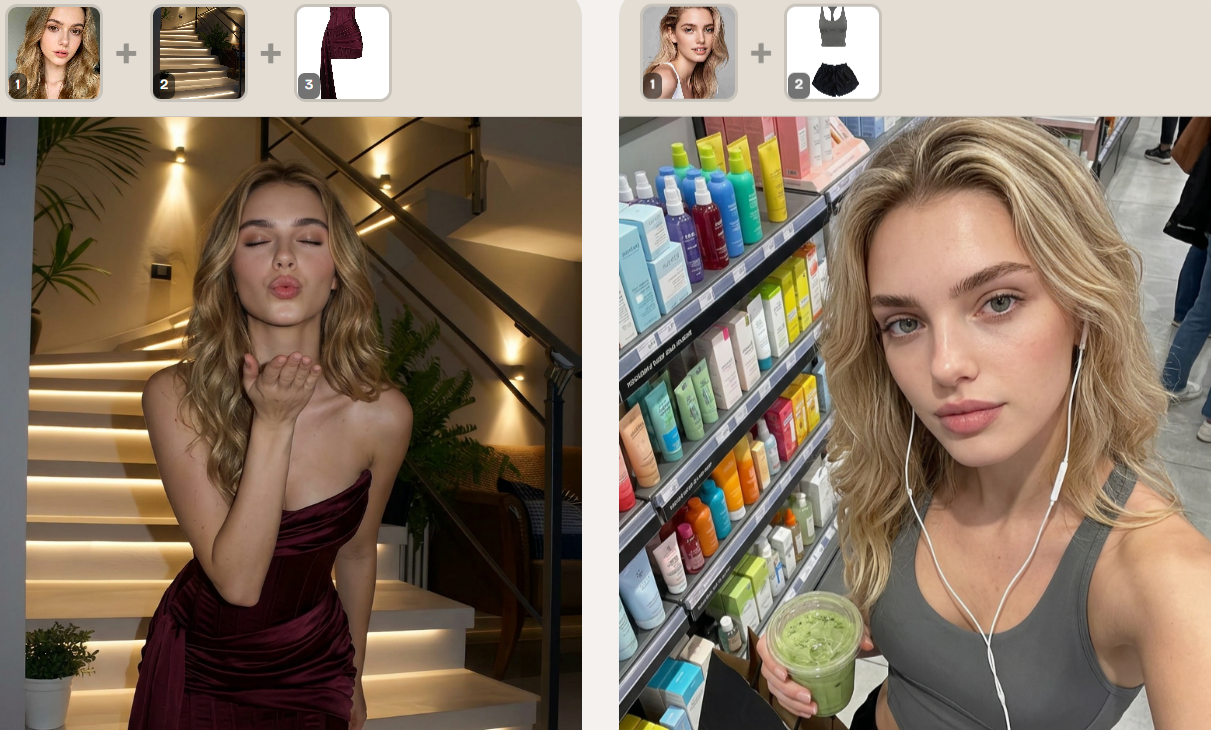
- Merge / composite — combine two or more source images into one (place a product on a model, blend a person into a new background, swap a sky).
All three jobs run on the same underlying technology — a diffusion model conditioned on both an image and text — but each is exposed by a different kind of tool.
How does a free image to image AI tool actually work?
The process looks like this under the hood:
- Upload your source image. JPG, PNG, or WebP up to ~4.5 MB.
- Write a prompt describing the change. "Make this a watercolor illustration." "Place the sneakers on the model's feet." "Change the season to autumn."
- The model encodes the photo into a latent representation — essentially a compressed map of the image's structure, edges, and content.
- Your prompt is mixed into that encoding via cross-attention, steering the decode toward the change you described.
- A new image is decoded from the modified latent. Output is typically 1024×1024 to 2048×2048px, returned in 5–15 seconds on a modern GPU.
Free tiers of image to image AI tools usually limit daily credits and resolution; paid tiers raise both and add batch processing.
What can you do with image to image AI free?
Restyle a photo in one click
Turn a real photograph into a watercolor, oil painting, pencil sketch, anime cel, or pixel art without re-shooting anything. Best for mood boards, social posts, and concept art where the original scene is the starting point.
Re-light and re-season a scene
Keep the composition, change the time of day, weather, or lighting. "Make it sunset." "Add snow." "Convert to studio softbox lighting." Useful for real-estate, automotive, and travel photography where re-shooting is expensive.
Edit a single image with a text instruction
Replace a tired background, swap a model's outfit, change hair color, restyle a product photo, or add a missing element. The model keeps the subject's identity and lets you rewrite everything around them.
Merge two or more photos into one
Place a product on a model, drop a subject into a new scene, blend two portraits into one composite, or build a quick mood board. This is the job of a multi-input image to image AI like
Create variations for A/B testing
Generate 2–4 variations of the same image at once and pick the best. Marketers use this to test thumbnail styles; product photographers use it to test backgrounds before re-shooting the full set.
Best free image to image AI tools in 2026
| Tool | Inputs | Best for | Free tier limit | Strength |
|---|---|---|---|---|
| DreamPixel AI Image Editor | 1 image + prompt | Restyle, re-light, single-subject edits | Daily credits, 1024–2048px | Identity-preserving edits, instant results |
| DreamPixel AI Merge & Composite | 2–8 images + prompt | Multi-photo composites, product-on-model | Daily credits, 1024–2048px | Up to 8 inputs, prompt-driven composition |
| Adobe Firefly | 1 image + prompt | Commercial-safe edits, Photoshop integration | Limited generations per month | Adobe stock-trained, enterprise license |
| Stable Diffusion (self-hosted) | 1+ images + prompt | Full control, no daily limits | Free if you run your own GPU | Open weights, extensible |
| Microsoft Designer | 1 image + prompt | Quick social-post restyles | Free with Microsoft account | Tight integration with Microsoft 365 |
| Playground AI | 1 image + prompt | Restyle + design canvas | Daily credits | Friendly editor UI |
For most creators, DreamPixel's free image to image AI tools are the right starting point: the editor handles single-photo work, the merge tool handles composites, and you only need a browser.
How to use image to image AI free (step by step)
Restyle a single photo
- Open .Try it freeAI Image EditorTransform a single photo with a text prompt — restyle, re-light, re-imagine.
- Upload your photo — JPG, PNG, or WebP, up to 4.5 MB.
- Type a prompt describing the change. "Convert to watercolor illustration." "Make it 1980s film stock." "Studio softbox lighting on a white background."
- Pick a quality tier and aspect ratio if the tool offers them.
- Generate. The result lands in 5–15 seconds.
- Download the result as PNG-24 (transparency supported) or JPG (smaller file size).
Merge two or more photos
- Open .Try it freeAI Merge & CompositeCombine up to 8 photos into a single AI-composed image.
- Upload 2 to 8 source images — for example, a product photo, a model photo, and a background scene.
- Type a prompt describing the composition. "Place the sneakers on the model's feet, soft daylight, marble floor."
- Choose a quality tier and aspect ratio.
- Generate. The model composites all inputs into one image based on your prompt.
- Download or refine the prompt if the layout isn't quite right.
Tips for getting great results on the first try
- Be specific in your prompt. "Studio softbox on a white background" beats "make it look professional." The model has no way to ask a clarifying question.
- Use a high-resolution source. Inputs under 1024px lose fine detail along edges. If your photo is small, upscale it with first.Try it freeAI Image UpscalerUpscale photos up to 4× without losing detail.
- Keep the subject in focus. A blurry or low-contrast subject gives the model nothing to anchor to.
- Avoid copyrighted prompts. "In the style of a living artist's name" is rejected on most platforms. Style names that work: watercolor, oil painting, studio photography, risograph, anime cel.
- Generate in batches. Run 2–4 outputs at once and pick the best. The first output is rarely the keeper.
- For multi-image merges, lead with the most important image. The first uploaded image carries the most weight in the composite — if you're placing a product on a model, the product should be input #1.
Free image to image AI limitations to know
Free tiers of image to image AI tools in 2026 share a few common limits:
- Daily credit cap. Most free plans give you enough generations for 5–20 edits per day, with no roll-over.
- Resolution cap. Free outputs usually top out at 1024–2048px on the long edge. For print, you'll need a paid tier or an upscaler.
- Queue time during peak hours. Weekday evenings and weekends can queue generations 30 seconds to 2 minutes longer than usual.
- No batch export. Free tiers typically let you generate one image at a time; batch processing is paid.
- License varies by tool. Some free tools reserve rights over outputs; others (including DreamPixel) grant full commercial use. Always check.
When to upgrade from free to paid
Upgrade when you hit any of these:
- You're processing more than ~20 images a day. At that volume, paid per-image pricing is usually cheaper than lost time.
- You need 4K output for print. Free tiers cap at 2048px; paid tiers unlock 4096px and beyond.
- You need batch processing. Uploading 50 product photos one at a time isn't workable past the first week.
- You need API access. Most free tools are web-only; an API unlocks workflow integration.
Image to image AI free: quick answers
- Best for single-photo restyle: DreamPixel AI Image Editor.
- Best for multi-photo composites: DreamPixel AI Merge & Composite.
- Best for commercial-safe enterprise use: Adobe Firefly.
- Best for full control and no limits: Self-hosted Stable Diffusion with a GPU.
- Best for casual social-post restyles: Microsoft Designer.
Final thought
A free image to image AI tool in 2026 is no longer a novelty — it's a daily creative utility. The right tool depends on the job: single-photo edits go through an image-to-image editor, multi-photo composites go through a merge tool, and anything beyond 20 generations a day probably needs a paid plan. Start free, find the workflow that fits, and upgrade only when the cost of the limits outweighs the cost of the subscription.
Want a workflow question answered? Get in touch — we read every message.
Try these tools
Frequently Asked Questions
What is image to image AI free?
Image to image AI free is a class of online tools that take a photo plus a text prompt and return a transformed version of that photo — restyled, re-lit, merged with another image, or reimagined entirely — at no cost. Most free tiers cover everyday creative work; the main limits are resolution, daily credits, and queue speed.
Is there a truly free image to image AI in 2026?
Yes. Several platforms — including DreamPixel — let you run image to image AI generations without paying, with a small daily credit allowance. Paid plans raise the resolution cap, remove the queue, and add batch processing.
How does image to image AI work?
You upload a source image, write a prompt describing the change you want, and the model encodes the photo, mixes your text instructions into the encoding, and decodes a new image. Modern diffusion-based I2I models do this in 5–15 seconds at 1024–2048px.
Can I merge two photos with image to image AI for free?
Yes. A multi-input image to image AI — such as DreamPixel's AI Merge & Composite — accepts 2 to 8 photos and composes them into a single image based on your prompt. Common uses: place a product on a model, swap a sky, blend a person into a new scene.
What is the best free image to image AI for portraits?
For single-subject portraits, a one-input image to image AI editor with a strong identity-preservation model gives the most natural results. For group photos, use a merge-and-composite tool that lets you specify which subject to keep and which to replace.
What size images can I upload to a free image to image AI tool?
Most free tools accept up to 4.5 MB or 3500px on the long edge. DreamPixel compresses anything larger automatically in the browser so the upload still goes through.
Do free image to image AI tools keep my photos private?
Reputable free tools delete your uploads within 24–72 hours. Avoid uploading anything sensitive to tools that keep inputs for model training unless their policy explicitly says otherwise.
Can I use image to image AI results commercially?
On DreamPixel, yes — outputs from free generations can be used in ads, product listings, and client work. Always double-check the license of any third-party image to image AI tool before commercial use; some reserve rights to your outputs.
Sources
- Stability AI — Stable Diffusion Image-to-Image Technical Report — Reference for how diffusion-based image-to-image models encode a source photo and decode a transformed version conditioned on a text prompt.
- Google Research — Imagen Editor (2024) — Reference for modern I2I editing capabilities including local edits, style transfer, and mask-guided transforms.
- Adobe — Photoshop Generative Fill Documentation — Reference for how commercial editors expose I2I features inside existing creative workflows.