How Does AI Face Swap Work? A Complete Guide to Face Swapping
AI face swap detects a face in each photo, encodes the source identity, then re-renders it into the target scene. Here is the full pipeline, stage by stage.
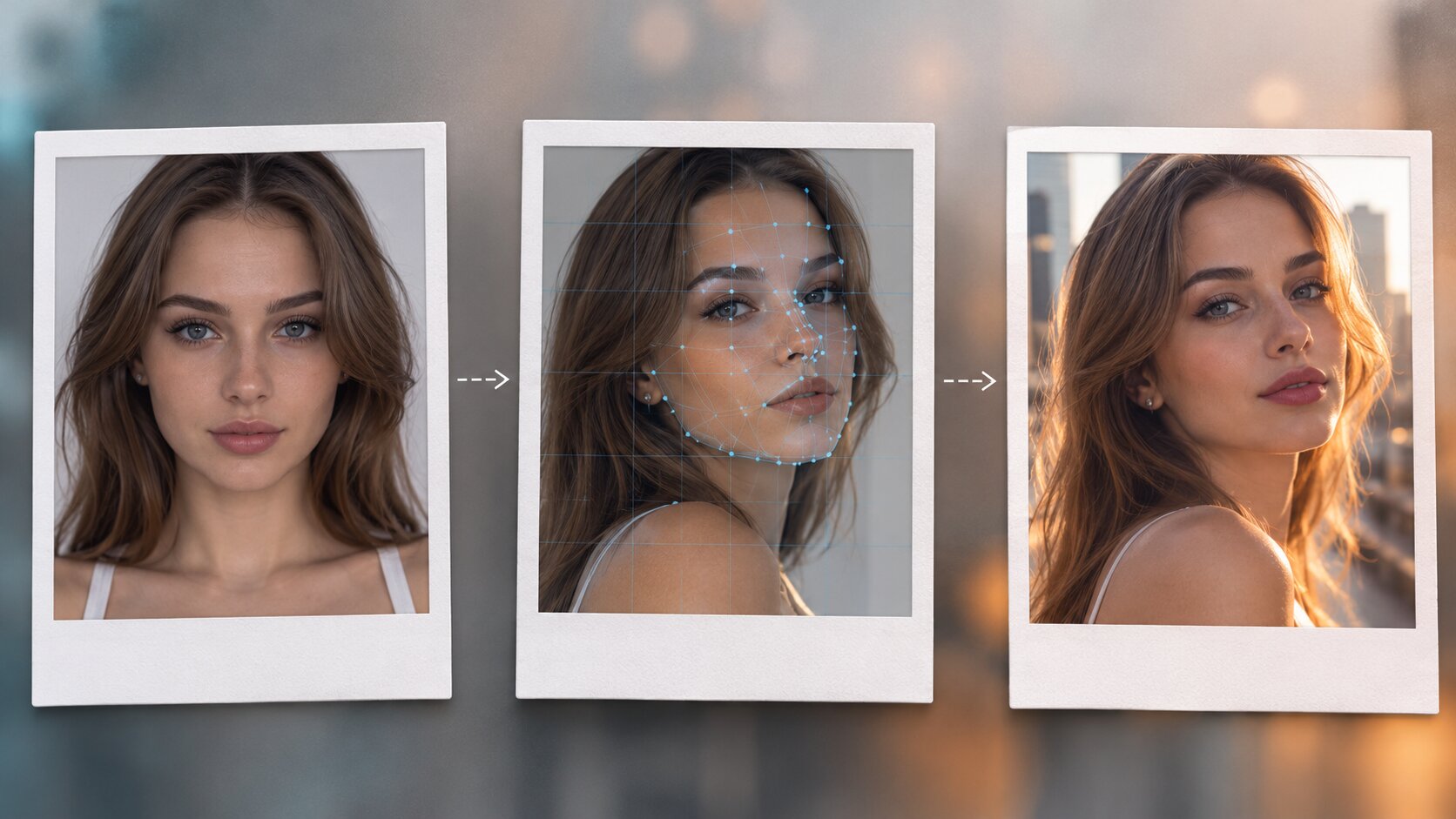
AI face swap works by measuring who is in the first photo, measuring the pose and lighting of the second, and generating a brand-new face that is both at once. Nothing is copy-pasted. The face is detected, aligned, encoded into an identity fingerprint, and then re-rendered from scratch inside the target scene — which is why the result keeps the target's expression and angle while still looking like the person you uploaded.
Dream Pixel AI's Try it freeAI Face SwapSwap faces between two photos with realistic results. runs that pipeline in the browser, so you can see the whole thing end to end in about the time it takes to read this paragraph.
How Does AI Face Swap Work? The Full Pipeline
Every face swap system, from a free browser tool to a research lab, runs five stages in the same order.
1. Detect the face in the source image
A detection network scans the photo for a face and returns a bounding box plus a set of landmark points — typically 68 or 106 of them, marking the jawline, eyes, nose, mouth and eyebrows. The number of people in the photo does not matter much here; what matters is that the tool finds a face and knows exactly where its features sit.
2. Detect and align both faces
The same detection runs on the target photo. Then both faces are rotated, scaled and cropped to a canonical orientation — the face is straightened so the eye line is horizontal and the head fills the same fraction of the frame.
This stage is the one people underestimate. If the source face is at 20° and the target is at 0°, the decoder has to invent an intermediate pose, and the invented geometry is exactly what makes a swap look uncanny. Alignment does not fix a bad angle; it makes the mismatch explicit so the model handles it honestly.
3. Encode the source identity
A recognition network turns the aligned source face into a compact numerical vector — the identity embedding. It is a few hundred numbers that encode who the person is while deliberately discarding pose, expression, lighting, hair and background.
This is the conceptual heart of face swapping. Identity and appearance are separated. Once the identity is captured in a form that no longer contains a lighting model or a head angle, it can be decoded into a completely different lighting model and head angle.
4. Decode the identity into the target
A second network takes the identity vector and the target's appearance representation — its pose, expression, eye direction, mouth shape and lighting — and generates a new face. The decoder was trained on pairs of the same person in different conditions, so it learns the mapping from "identity under these conditions" to "that identity rendered under those conditions."
During training the decoder also learns to hallucinate the parts of the face it cannot read from either image. That is why a swapped face still has plausible pores and plausible wrinkles instead of the smooth plastic look of a naive cut-and-paste.
5. Blend the face back into the scene
The generated face is colour-matched to the target's colour temperature, its edges are feathered into the surrounding hair and jaw, and its contrast is matched to the local lighting. Then it is composited back over the original target photo.
| Stage | What it produces | What breaks it |
|---|---|---|
| Detection | A bounding box and landmarks | Faces smaller than ~60px, heavy occlusion, extreme profile angles |
| Alignment | Two faces in a shared coordinate frame | Big pose mismatches between the two photos |
| Identity encoding | An identity vector | Blur, motion smear, an over-processed or filtered face |
| Decoding | A new face in the target's pose | Low-resolution source, hard shadows, heavy contrast |
| Blending | A seamless composite | Mismatched colour temperature, busy backgrounds, hair over the face |
Why this is different from Photoshop
A manual face swap copies pixels. The pixels carry the original lighting, the original camera grain, the original skin texture, and — critically — the original shadow direction. That is why a pasted face reads as fake to a human eye within a second, even when it is technically well aligned.
Generative swapping throws the pixels away. The new face is lit by the target's light and shaded by the target's pose, so it belongs to the new scene by construction. When it goes wrong, it goes wrong in a generative way — a slightly wrong nose or an off skin tone — rather than in the obviously composited way of a copy-paste.
What Actually Makes a Swap Look Real
Four things carry most of the realism, and they are worth understanding because they are also the four levers a user controls.
Lighting agreement. The brightest part of the face should be on the same side as the brightest part of the scene. When it is not, the face reads as artificial no matter how good the geometry is.
Skin tone continuity. Most models take the skin tone from the source face and the shading from the target. Mixing a very light source with a very dark target produces a face that looks painted on.
Edge behaviour. Hair, the jawline and the ears are the hardest parts to blend. A halo of bright pixels along the hairline is the single most common tell.
Resolution and grain. A face rendered at 1024px and pasted into a 4000px photo will be visibly softer than its surroundings. The eye reads the mismatch as "composite" even without naming why.
Common Problems and Solutions
| Symptom | Why it happens | What to do |
|---|---|---|
| The face looks like a different person | The identity vector was weak — source too small, blurred or filtered | Use a sharper, closer, unretouched source portrait |
| The face is pasted on | Source and target angles differ too much | Match the head angle of the two photos within about 15° |
| Skin colour does not match the neck | The model took tone from the source, shade from the target | Pick a target whose lighting matches the source more closely, or a source with a similar tone |
| A bright rim around the hair | The blend stage could not find a clean boundary | Choose a target where hair falls against a simple background |
| The result looks sharper than the photo | Source resolution was much higher than the target's | Generate at a quality tier that matches the target, then downscale |
| The whole face is smoothed and plastic | The source was heavily beautified or smoothed | Use an unedited source photo |
| The head does not match the body | The target face and body are at different angles | Fix the target photo before swapping, not after |
What Face Swap Can and Cannot Do
Single photo swaps are the standard case: one face, one target, one output. They are fast, legal in most creative contexts, and easy to control.
Group photos are harder. Most single-face tools swap only the most prominent face, because the detector returns one box per call. Swapping several faces in one photo means running the pipeline once per face and compositing the results, which is why dedicated multi-face tools exist.
Video is a different problem again. Each frame needs the swap applied and then temporally smoothed, otherwise the face flickers and swims. Video pipelines also have to track the face across movement, occlusion and expression changes — several times more work per frame than a photo.
Real-time swaps run the same model on video frames at 30 or 60 fps, which requires a much smaller, faster variant of the network, usually with lower output resolution.
Which AI Face Swap Tool to Use
- Best for a single-photo swap in a browser: Try it freeAI Face SwapSwap faces between two photos with realistic results. — two upload slots, one button, and one to four variations per run.
- Best when you need a face first: Try it freeAI Face GeneratorGenerate realistic AI faces for any creative use. — generates a source portrait you can then swap into a scene.
- Best when you want the whole photo re-rendered, not just the face: Try it freeAI Image EditorTransform a single photo with a text prompt — restyle, re-light, re-imagine. — one photo, one prompt, style and lighting included.
- Best for maximum control and no usage limits: a self-hosted InsightFace or equivalent pipeline on your own GPU.
Frequently Asked Questions
How does AI face swap work in simple terms?
The software finds the face in your first photo, finds the face in your second photo, and then generates a new face that keeps the identity of the first while copying the pose, expression and lighting of the second. It does this by measuring a numeric "identity fingerprint" of the source face and rebuilding that face to match the target instead of copying the source pixels across.
What is an identity embedding in face swapping?
It is a short numeric vector that a trained network produces for a face, capturing who the person is rather than how the photo looks. Because the vector is independent of pose and lighting, the decoder can rebuild the same person at a different angle, expression and colour temperature.
How long does an AI face swap take?
On Dream Pixel AI a single swap finishes in seconds at 1K resolution. Higher quality tiers take longer because the model renders at a larger working resolution, and asking for four variations at once multiplies the wait.
Why does my AI face swap look pasted on?
Almost always one of three things: the two faces were at very different angles, the target photo had harsh or backlighting, or the skin tone and colour temperature did not match. Alignment fixes the first, a better target fixes the second, and the colour-matching stage handles the third.
Does AI face swap copy the background too?
No. Only the face region is regenerated. The background, the body, the clothing and the pose of the target photo are preserved, which is why the tool needs a target photo that already looks right.
Can AI face swap work on videos?
Yes, but it is a different pipeline. Video tools run the same detection and blending on every frame with temporal smoothing so the face does not flicker between frames. Still-photo tools do not do this, so applying a photo model frame by frame produces visible jitter.
Is AI face swap detection reliable?
Detectors that look for physical tells — warped backgrounds, odd skin texture, asymmetric ears — catch older generations reliably and newer ones less so. The current generation is better judged by how the face behaves: if it does not track the head properly or the lighting does not agree with the scene, it reads as synthetic.
Want a workflow question answered? Get in touch — we read every message.
Try these tools
Try it freeAI Face SwapSwap faces between two photos with realistic results.Try it freeAI Image EditorTransform a single photo with a text prompt — restyle, re-light, re-imagine.Try it freeAI Face GeneratorGenerate realistic AI faces for any creative use.Try it freeAI Professional HeadshotsGenerate studio-quality headshots from a single selfie.Sources
- InsightFace — Open-source face analysis toolkit — Reference for the detection, alignment and recognition stages used by most identity-preserving face swap models.
- MIT Media Lab — DeepFake detection research — Reference for how synthetic faces are identified and why lighting and boundary artefacts are the usual tells.
- arXiv — Identity-Preserving Face Swapping survey — Reference for the encoder-decoder architecture that separates identity from appearance in face swap models.
- U.S. Federal Trade Commission — AI-generated content and impersonation guidance — Reference for consent and disclosure expectations when publishing synthetic faces.