AI Face Swap: How It Works, Best Free Tools & Step-by-Step (2026)
Learn how AI face swap works, what the best free tools are in 2026, and how to swap faces realistically in any photo in under a minute.
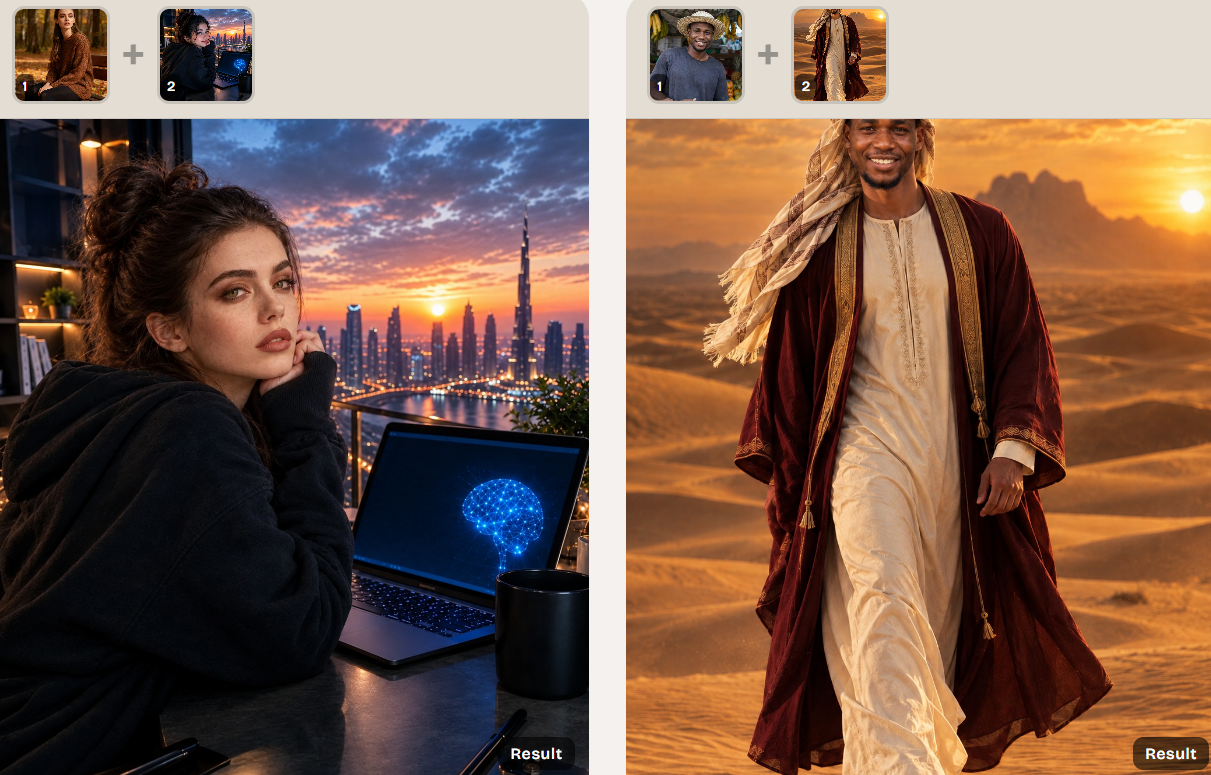
title: 'AI Face Swap: How It Works, Best Free Tools & Step-by-Step (2026)' slug: 'ai-face-swap' description: "Learn how AI face swap works, what the best free tools are in 2026, and how to swap faces realistically in any photo in under a minute." primaryKeyword: 'AI face swap' secondaryKeywords:
- 'free AI face swap'
- 'AI face swap online'
- 'face swap AI free'
- 'AI face swap app'
- 'AI face swapper'
- 'AI photo face swap' category: 'tutorials' contentType: 'how-to' tags:
- 'face-swap'
- 'ai-tools'
- 'photo-editing'
- 'tutorial' author: 'DreamPixel Team' authorBio: "DreamPixel's image team builds free AI tools used by 50,000+ creators every month." publishedAt: '2026-10-10T11:00:00.000Z' updatedAt: '2026-10-10T11:00:00.000Z' lastReviewed: '2026-10-10T11:00:00.000Z' coverImage: '/images/ai-face-swap.png' coverAlt: 'Two side-by-side photos connected by an arrow, demonstrating an AI face swap from a source portrait to a target scene.' relatedTools:
- 'ai-face-swap'
- 'ai-image-editor'
- 'ai-merge-composite'
- 'ai-face-generator' keyTakeaways:
- 'AI face swap is a generative technique that blends a source face into a target photo while preserving identity, lighting, and expression.'
- 'The best results come from a clear, front-facing source face and a high-resolution target photo with even lighting.'
- 'Most free AI face swap tools in 2026 generate 1–4 variations per run at 1K resolution; 4K is paid.'
- 'Identity preservation is the key quality marker — a good face swap is undetectable to a casual viewer.'
- 'Use AI face swap for memes, creative edits, headshots, and concept art. Never to mislead, impersonate, or create non-consensual intimate imagery.' faq:
- question: 'What is AI face swap?' answer: 'AI face swap is a generative technique that takes a source face photo and a target photo and produces a new image where the source face appears in the target scene — preserving identity, lighting, and expression. Modern tools run in a browser and return results in 5–15 seconds.'
- question: 'Is AI face swap free?' answer: 'Yes. Several AI face swap tools — including DreamPixel — let you swap faces online for free with a daily credit allowance. Paid plans raise the resolution cap, add 4K output, and remove queue time.'
- question: 'Is AI face swap safe and legal?' answer: 'The technology itself is legal and widely used in film, advertising, and memes. What matters is consent and context. Never swap a real person''s face onto intimate, defamatory, or misleading content without their permission. Most reputable tools explicitly forbid non-consensual use in their terms.'
- question: 'How does AI face swap work?' answer: 'The model detects a face in the source photo, detects a face in the target photo, encodes the source face''s identity, and decodes that identity into the target''s pose, lighting, and expression. Modern identity-preserving models do this in 5–15 seconds at 1024–2048px.'
- question: 'What is the best AI face swap tool in 2026?' answer: 'For a free, browser-based, identity-preserving swap, DreamPixel AI Face Swap is a strong pick. For mobile-first casual use, Reface is popular. For film-quality, paid tools like Runway and Akool lead. The right choice depends on whether you need free, mobile, or pro-grade output.'
- question: 'Can I use AI face swap on videos?' answer: 'Yes — but most free online tools work on still photos only. For video face swap you need a dedicated video tool (e.g. Runway, Akool, HeyGen) or a self-hosted model. Output is typically 720p–4K and can take 1–10 minutes per minute of video on a paid plan.'
- question: 'How do I get a realistic AI face swap?' answer: 'Use a clear, front-facing source face with no glasses, hat, or hand occluding the face. Use a target photo that is at least 1024px on the long edge with even lighting. Avoid extreme angles (above 30°) and heavy backlight. Generate 2–4 variations and pick the most natural one.'
- question: 'Will AI face swap work on group photos?' answer: 'Yes for the dominant face in the target photo. Group photos with multiple faces typically swap only one face at a time. For full multi-face swaps, you need a paid tool or to run single-face swaps sequentially.' citedSources:
- name: 'InsightFace — Face Recognition & Swapping Research' url: 'https://github.com/deepinsight/insightface' note: 'Open-source reference for face detection, alignment, and identity-preserving face swap models.'
- name: 'MIT Media Lab — DeepFake Detection Research (2024)' url: 'https://www.media.mit.edu/articles/detect-deepfakes/' note: 'Reference for how identity-preserving face swap models work and how to detect synthetic faces.'
- name: 'U.S. Federal Trade Commission — AI-Generated Content Consumer Guidance' url: 'https://www.ftc.gov/business-guidance/blog/2023/2023-09-ai-generated-content-and-impersonation-fraud' note: 'Reference for the legal and ethical use of face swap technology in marketing and advertising.' draft: false featured: true
AI face swap is a generative technique that takes a face from one photo and places it into another — keeping identity, lighting, and expression natural — in under 15 seconds. In 2026 the technology is reliable enough for everyday creative work, and the best free tools produce results that are visually indistinguishable from a real photo.
This guide explains exactly how AI face swap works, what the best free tools are, and how to get a realistic result on the first try using
What is AI face swap?
AI face swap is a category of generative models that take a source face photo and a target photo and return a new image where the source face has been blended into the target scene. The result preserves the source person's identity while matching the target's pose, lighting, and expression.
The most common jobs:
- Meme and creative edits — place a friend, celebrity, or character into a new scene for fun.
- Headshot and LinkedIn photos — re-light, re-pose, or re-style an existing portrait without re-shooting.
- Concept art and pre-visualization — preview how a character would look in a different costume, age, or setting.
- Ad creative and localization — adapt a campaign image to a different model without booking a new shoot.
All four run on the same underlying technology — an identity-preserving model that decodes the source face into the target's pose and lighting.
How does AI face swap actually work?
The process looks like this under the hood:
- Detect and align the source face. The model finds the source face, identifies 68–106 facial landmarks, and crops the face to a standard orientation.
- Detect and align the target face. The same process runs on the target photo to get the pose, expression, and lighting.
- Encode the source identity. A neural network extracts an identity vector — a numeric fingerprint of "who" the source is.
- Decode into the target pose and lighting. A second network decodes the identity vector conditioned on the target's pose, expression, and lighting, producing a new face image.
- Blend the result back into the target scene. The new face is color-matched, edge-blended, and composited into the original target photo.
The whole pipeline runs in 5–15 seconds on a modern GPU. Most free tools let you generate 1–4 variations per run and pick the best.
What can you use AI face swap for?
Memes and creative edits
The original use case — swap a face into a movie still, a classic painting, or a viral meme. Free tools make this trivially fast: pick a face, pick a target, generate.
Re-light or re-style a headshot
Keep the same person, change everything else. Move a LinkedIn photo from a fluorescent office to a soft daylight studio, change the season, swap the outfit. The face stays identical; the scene around it changes.
Pre-visualize a character
Concept artists and filmmakers use face swap to preview a casting choice, a costume change, or an age progression before committing to a final design.
Adapt ad creative to a new audience
Marketing teams use face swap to localize a campaign without booking a new model. The product, the composition, and the brand stay the same; the face changes to match the target market.
Best free AI face swap tools in 2026
| Tool | Free tier | Best for | Strength |
|---|---|---|---|
| DreamPixel AI Face Swap | Daily credits, 1K output | Browser-based, identity-preserving swaps | 1–4 variations per run, optional style prompt |
| Reface | Daily limit, watermark | Mobile casual memes | Fast, app-style UX |
| FaceApp | Limited free | Quick face edits beyond swap | Large feature set, mobile-first |
| InsightFace (self-hosted) | Free if you run your own GPU | Unlimited generations, no queue | Open-source, full control |
| Akool | Trial credits | Marketing-quality swaps | High fidelity, 4K output on paid |
| HeyGen | Trial credits | Video face swap | Strong on talking-head video |
For most creators, DreamPixel's free AI face swap is the right starting point: browser-based, identity-preserving, and built for single-photo swaps with 1–4 variations per run.
How to use AI face swap (step by step)
Step 1 — Open the AI Face Swap tool
Go to
Step 2 — Upload the source face
Drag and drop a clear, front-facing photo of the face you want to use. Best results come from:
- Eyes looking at or near the camera
- No glasses, hat, hand, or hair occluding the face
- Even lighting — no harsh shadows across the face
- Resolution 512px or larger on the face
Step 3 — Upload the target photo
Drag and drop the photo you want the face placed into. Best results come from:
- High resolution (1024px+ on the long edge)
- The target face at a similar angle as the source
- Even, natural lighting
- A clear, unobstructed face
Step 4 — Add an optional style prompt
The tool accepts an optional prompt to guide the result. Try:
- "natural lighting, soft daylight, neutral expression"
- "cinematic, warm tones, shallow depth of field"
- "professional headshot, studio softbox, clean background"
A blank prompt gives the most neutral swap.
Step 5 — Generate
Pick 1–4 variations and a quality tier (1K free, 4K paid). The model runs in 5–15 seconds and shows each variation side by side so you can pick the best.
Step 6 — Download
Click any result to open it in the lightbox preview, then download as PNG (full quality) or JPG (smaller file). Outputs are saved to your account gallery so you can return to them later.
Tips for a realistic AI face swap
- Source face should be front-facing, eyes visible, no occlusion. Sunglasses, hands, hats, and extreme angles all degrade identity preservation.
- Match the source angle to the target. A source face at 0° works best with a target at 0°–15°. Mismatched angles force the model to invent a pose and the result looks uncanny.
- Use 1024px+ target photos. Below 1024px the model loses fine edge detail along the jaw and hairline.
- Generate in batches. Run 2–4 variations at once and pick the most natural — the first output is rarely the keeper.
- Avoid heavy backlight on the target. Strong backlight creates a halo around the original face that the model has to remove. Soft, even lighting gives the cleanest result.
- Don't swap a face into a heavily filtered target. Beauty filters, heavy skin smoothing, and heavy color grading on the target photo make the swap look pasted-on.
Common mistakes that ruin an AI face swap
Mistake 1 — Source face is too small or low resolution
If the source face is under ~256px, the model can't extract a stable identity. Use a close-up portrait, not a group photo where the face is a small dot.
Mistake 2 — Target face is in heavy shadow
If half the target face is in deep shadow, the model has to invent the missing half. Re-shoot the target under even lighting, or pick a different target.
Mistake 3 — Mixing ethnicities and skin tones
Most face swap models preserve skin tone from the source. Putting a light-skinned source face onto a dark-skinned target will look uncanny. Match the source and target skin tones as closely as you can.
Mistake 4 — Skipping the variation step
A single generation often has subtle artifacts — slightly off color, slightly wrong expression, slightly pasted edges. Generating 2–4 variations lets you pick the one that looks natural.
Mistake 5 — Using a celebrity face without consent
Beyond the ethics, most tools explicitly prohibit non-consensual celebrity face swaps in their terms. Use your own face, a friend's face with permission, or a licensed stock identity.
AI face swap: legal and ethical quick guide
- Your own face — always fine.
- A friend's face, with their permission — fine for personal or paid creative work.
- A celebrity's face — restricted. Most platforms prohibit non-consensual celebrity swaps. Parody and satire are usually protected, but consult a lawyer for commercial use.
- Anyone's face in intimate, defamatory, or misleading content — illegal in most jurisdictions. Don't do it.
When to upgrade from free to paid
Upgrade when you hit any of these:
- You're processing more than ~20 swaps a day. At that volume, paid per-image pricing is usually cheaper than lost time.
- You need 4K output for print or high-res display. Free tiers cap at 1K; paid tiers unlock 4K.
- You need batch processing. Most free tools process one swap at a time.
- You need video face swap. Video tools are almost universally paid.
AI face swap: quick answers
- Best free browser-based face swap: DreamPixel AI Face Swap.
- Best mobile casual meme tool: Reface.
- Best self-hosted unlimited tool: InsightFace on your own GPU.
- Best marketing-quality paid tool: Akool.
- Best video face swap: HeyGen (paid).
Final thought
Free AI face swap in 2026 is no longer a novelty — it's a daily creative utility. The right tool depends on the job: single-photo swaps go through a browser-based face swap tool, video goes through a paid video tool, and anything beyond 20 swaps a day probably needs a paid plan. Start free, find the workflow that fits, and upgrade only when the cost of the limits outweighs the cost of the subscription.
Want a workflow question answered? Get in touch — we read every message.
Try these tools
Frequently Asked Questions
What is AI face swap?
AI face swap is a generative technique that takes a source face photo and a target photo and produces a new image where the source face appears in the target scene — preserving identity, lighting, and expression. Modern tools run in a browser and return results in 5–15 seconds.
Is AI face swap free?
Yes. Several AI face swap tools — including DreamPixel — let you swap faces online for free with a daily credit allowance. Paid plans raise the resolution cap, add 4K output, and remove queue time.
Is AI face swap safe and legal?
The technology itself is legal and widely used in film, advertising, and memes. What matters is consent and context. Never swap a real person's face onto intimate, defamatory, or misleading content without their permission. Most reputable tools explicitly forbid non-consensual use in their terms.
How does AI face swap work?
The model detects a face in the source photo, detects a face in the target photo, encodes the source face's identity, and decodes that identity into the target's pose, lighting, and expression. Modern identity-preserving models do this in 5–15 seconds at 1024–2048px.
What is the best AI face swap tool in 2026?
For a free, browser-based, identity-preserving swap, DreamPixel AI Face Swap is a strong pick. For mobile-first casual use, Reface is popular. For film-quality, paid tools like Runway and Akool lead. The right choice depends on whether you need free, mobile, or pro-grade output.
Can I use AI face swap on videos?
Yes — but most free online tools work on still photos only. For video face swap you need a dedicated video tool (e.g. Runway, Akool, HeyGen) or a self-hosted model. Output is typically 720p–4K and can take 1–10 minutes per minute of video on a paid plan.
How do I get a realistic AI face swap?
Use a clear, front-facing source face with no glasses, hat, or hand occluding the face. Use a target photo that is at least 1024px on the long edge with even lighting. Avoid extreme angles (above 30°) and heavy backlight. Generate 2–4 variations and pick the most natural one.
Will AI face swap work on group photos?
Yes for the dominant face in the target photo. Group photos with multiple faces typically swap only one face at a time. For full multi-face swaps, you need a paid tool or to run single-face swaps sequentially.
Sources
- InsightFace — Face Recognition & Swapping Research — Open-source reference for face detection, alignment, and identity-preserving face swap models.
- MIT Media Lab — DeepFake Detection Research (2024) — Reference for how identity-preserving face swap models work and how to detect synthetic faces.
- U.S. Federal Trade Commission — AI-Generated Content Consumer Guidance — Reference for the legal and ethical use of face swap technology in marketing and advertising.